
If you’re an OFM manager staring at a calendar packed with shoots, edits, and social posts, you know the drill: creating fresh, eye-catching content for your human models can feel like herding cats while juggling fire. Between scheduling sessions, ensuring consistency, and keeping up with platform algorithms, it’s easy to burn out before you’ve even hit your stride.
That’s where Pykaso AI steps in—a powerful, user-friendly tool designed to generate hyper-realistic AI content that looks just like your models, without the hassle of endless photoshoots or pricey editing software. Whether you’re whipping up teaser images for Instagram, sultry videos for TikTok, or exclusive posts for OnlyFans, Pykaso lets you scale your content game effortlessly.
Let’s break down how it works and what it can do for your agency.
At its core, Pykaso AI works by leveraging advanced machine learning to train custom models from your uploads, turning simple inputs into professional-grade visuals in seconds.
You start by signing up (they even toss in free “Gems” to get you going—no credit card required). Upload some reference photos of your human model, and Pykaso’s AI training feature (powered by LoRa technology) creates a personalized “digital twin” in about 20 to 30 minutes.
Tips For Taking Reference Pictures:
- Vary expressions: Use a mix of different expressions to prevent the LoRA from being locked into just one.
- Vary angles: Capture your subject from multiple angles to improve the the AI’s understanding of their appearance. Straight-on, then slightly to the sides, then more to the sides, and so on.
- Include body shots: Add a few medium or full-body shots in addition to close-ups to prevent the LoRA from overfitting on just the face and ensure correct body shape generation.
- Change clothing/hair/makeup: Include variations in hairstyles, makeup, and clothing to make the LoRA more versatile, but ensure the face remains the primary focus.
Uploading more images for training will result in better accuracy and consistency, but anything between 20 to 70 reference images will do. Start uploading with a free account at Pykaso here.
From there, it’s prompt magic: Describe what you want—like “your model in a beach bikini at sunset, smiling coyly”—and the tool generates consistent, photorealistic images or short videos. No tech wizardry needed; the interface is intuitive, with options to tweak styles, poses, lighting, and even enhance details like skin texture for that ultra-lifelike finish.
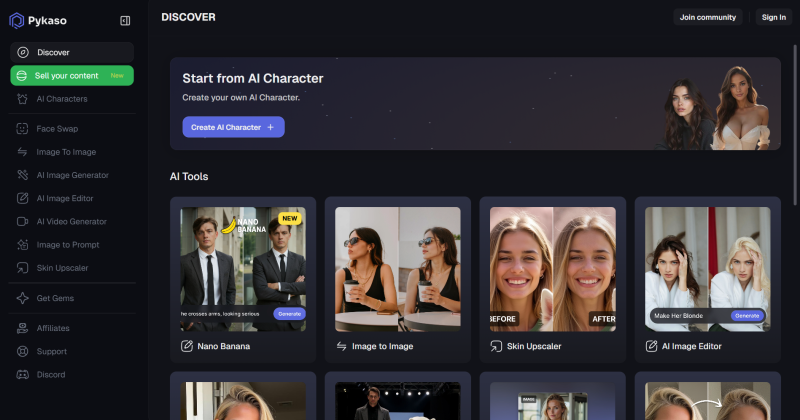
It’s all about efficiency—process multiple generations at once, upscale for high-res, and download ready-to-post files that comply with platform rules.
For managers like you, Pykaso shines in creating AI-generated content of your human models tailored for social media teasers and OnlyFans exclusives. Here’s how it transforms your workflow:
- AI Image and Video Generation: Feed it text prompts or reference images, and poof—custom visuals appear. Use it to produce endless variations of your model in different outfits, settings, or moods, perfect for daily social posts that drive traffic to OnlyFans without exhausting your real-life shooting schedule.
- Custom Model Training for Consistency: Train once on your model’s photos, then generate content where she always looks the same. This is gold for building a recognizable brand—fans love that reliable vibe, and it keeps your feeds cohesive across Instagram, TikTok, Threads, and X.
- AI Face Swap and Copy Style Tools: Got a killer pose from one shoot? Swap your model’s face onto it seamlessly, or copy lighting and angles from reference pics. Ideal for quick social media hooks that mimic real shoots but save hours (and travel costs).
- Skin Enhancer and Upscaler: Ditch the “uncanny valley” look—enhance textures for natural skin and boost resolution for crisp, pro-level posts. Your AI content will blend right in with human-shot stuff, boosting engagement on OnlyFans without a telltale “plastic” sheen.
- Batch Generation and Media Tools: Crank out up to four images (or hundreds in sync) at a time, plus downloaders for TikTok/Instagram inspo. It’s built for virality, helping you flood socials with teasers that funnel subs straight to your model’s OnlyFans page.
The beauty? Pykaso cuts those content headaches dramatically—agencies using it report slashing production time by 80% while ramping up post volume, leading to more eyes, more subs, and happier models who aren’t camera-fatigued. Plus, with collaborations like Fanvue, it’s primed for easy integration into your monetization strategy.
Ethical note: Always get your model’s buy-in and label AI content where needed to keep things above board.
Also, if you’re not interested in using a human model and just want to create a 100% AI character, check out my guide on that here.
Ready to get started? Swing by Pykaso.ai, grab those free Gems (credits) and start experimenting today. Your models’ feeds (and your sanity) will thank you.